Mostrando entradas con la etiqueta webdesign. Mostrar todas las entradas

viernes, 14 de mayo de 2010

quiqee – Añadiendo funciones a tu web con el doble click del ratón

Aunque no estamos acostumbrados a hacer doble click con el ratón mientras navegamos por las páginas web, es una función que podría aprovecharse para mostrar contenido extra, ofreciendo más información al lector.
En eso estaban pensando los responsables por quiqee.com, una aplicación que nos permite instalar un menú con varias interesantes funciones escondido detrás del doble click de cada palabra de nuestro texto.
Cada vez que alguien realice esta acción en cualquier palabra, se abrirá un menú parecido al mostrado en la captura superior, negro, vertical, y con opciones para buscar imágenes, vídeos, artículos y otras informaciones relacionadas con el tema.
El único problema que veo es que no creo que sea sencillo acostumbrar a los lectores a usar esa función. Pero bueno, tiempo al tiempo…

lunes, 10 de mayo de 2010

Adobe Contribute CS5 Windows LS4


Adobe Contribute CS5 Windows LS4 (DK_DE_ES_FI_FR_IT_NO_NL_BR_SE) | 475MB

Adobe® Contribute® CS5 software is a powerful web publishing and website management tool that integrates authoring, reviewing, and publishing in an easy-to-use WYSIWYG HTML editor. Increase web publishing productivity collaboratively while simplifying oversight and approval tasks.

Contribute features

True WYSIWYG web authoring enhanced
Take advantage of enhanced CSS rendering, which enables content authors to edit without writing code and to see the results of their edits instantly. Adobe® Contribute® CS5 immediately updates edits to XML content and Spry widgets.

viernes, 7 de mayo de 2010

Portable Adobe Flash Professional CS5 v11.0.0.485


Portable Adobe Flash Professional CS5 v11.0.0.485 | 242 Mb

Adobe® Flash® Professional CS5 software is the industry standard for interactive authoring and delivery of immersive experiences that present consistently across personal computers, mobile devices, and screens of virtually any size and resolution. Adobe® Flash® Professional CS5 software combines expressive design features like a new multilingual text engine and more realistic inverse kinematics effects with timesaving development features like extensible code snippets and enhanced ActionScript authoring options.

What's new in Flash Professional CS5

Code Snippets panel new
Reduce the ActionScript® 3.0 learning curve and enable greater creativity by injecting prebuilt code into projects.

ActionScript editor
Speed the development process with an improved ActionScript editor, including custom class code hinting and code completion.

domingo, 2 de mayo de 2010

Adobe Flash Catalyst CS5 v1.0 Multilingual


Adobe Flash Catalyst CS5 v1.0 Multilingual | 508 MB

Adobe Flash Catalyst CS5 is a new convenient tool for interactive design. Convert graphics Adobe Photoshop, Illustrator and Fireworks in the spectacular and fully interactive projects without writing code by multi-functional and unified platform Adobe Flash.

Create professional interfaces and interactive content without writing code

Capabilities
Easily create interactive interface elements
Interactive components
Beautiful animated transitions between states
Developments with boilerplate text
The use of video and dynamic sources
Integration with Illustrator Photoshopi
Design-based pages and state
Powerful prototyping
Direct export to SWF and Adobe AIR
Tight integration with FlashBuilder

Adobe ® Flash ® Catalyst ™ CS5 software is an approachable new interaction design tool. Transform Adobe Photoshop ®, Illustrator ®, and Fireworks ® artwork into expressive, fully interactive projects without writing code, and leverage the reach and consistency of the Adobe Flash Platform.

OS: WinAll
Language: English

Download from Hotfile
http://hotfile.com/list/481627/08ccd97


Download from Uploading
http://uploading.com/files/61ce2mc3/A.Flash.Catalyst.CS5.v1.0.Multilingual.part1.rar/
http://uploading.com/files/8ef3a45f/A.Flash.Catalyst.CS5.v1.0.Multilingual.part2.rar/
http://uploading.com/files/615m2m6b/A.Flash.Catalyst.CS5.v1.0.Multilingual.part3.rar/
http://uploading.com/files/2c5e8878/A.Flash.Catalyst.CS5.v1.0.Multilingual.part4.rar/
http://uploading.com/files/411a6d63/A.Flash.Catalyst.CS5.v1.0.Multilingual.part5.rar/
http://uploading.com/files/c6122d8d/A.Flash.Catalyst.CS5.v1.0.Multilingual.part6.rar/


Download from Rapidshare
http://rapidshare.com/files/382505310/A.Flash.Catalyst.CS5.v1.0.Multilingual.part1.rar
http://rapidshare.com/files/382505305/A.Flash.Catalyst.CS5.v1.0.Multilingual.part2.rar
http://rapidshare.com/files/382505304/A.Flash.Catalyst.CS5.v1.0.Multilingual.part3.rar
http://rapidshare.com/files/382505306/A.Flash.Catalyst.CS5.v1.0.Multilingual.part4.rar
http://rapidshare.com/files/382505308/A.Flash.Catalyst.CS5.v1.0.Multilingual.part5.rar
http://rapidshare.com/files/382505904/A.Flash.Catalyst.CS5.v1.0.Multilingual.part6.rar

sábado, 1 de mayo de 2010

Adobe Flash Professional CS5 FINAL


Adobe Flash Professional CS5 FINAL | 859MB

Adobe® Flash® Professional CS5 software is the industry standard for interactive authoring and delivery of immersive experiences that present consistently across personal computers, mobile devices, and screens of virtually any size and resolution. Adobe® Flash® Professional CS5 software combines expressive design features like a new multilingual text engine and more realistic inverse kinematics effects with timesaving development features like extensible code snippets and enhanced ActionScript authoring options.

What's new in Flash Professional CS5

Code Snippets panel new
Reduce the ActionScript® 3.0 learning curve and enable greater creativity by injecting prebuilt code into projects.


ActionScript editor
Speed the development process with an improved ActionScript editor, including custom class code hinting and code completion.

Creative Suite integration
Enhance productivity when using Adobe Creative Suite® components such as Adobe Photoshop®, Illustrator®, InDesign®, and Flash Builder™.

Flash Builder integration
Use Flash Builder as your primary ActionScript editor for Flash Professional projects.

Video improvements
Streamline video processes with on-stage video scrubbing and a new cue points property inspector.
Design immersive interactive experiences

50 trucos indespensables para desarrolladores Web y diseñadores


Guías de referencia rápida para diseñadores web echa por DZinepress.
Coleccion de cheat sheets específicamente para el desarrollo web que te ayudará con HTML, JavaScript, Python, Ruby-on-Rails, ajax, Adobe Photoshop, Adobe Illustrator, CSS3, HTML5, XHTML, XML, MooTools, ASP, VB Script, Prototype, MySQL, jQuery, SEO, htaccess, mod_rewrite, 3D Max, Cinema 4D R8, PHP and CSS.

Disable right-click

Disable right-click contextual menu.
$(document).ready(function(){
$(document).bind(”contextmenu”,function(e){
return false;
});
});

La desaparición del campo de texto de búsqueda

Ocultar cuando se hace clic en el campo de búsqueda, el valor. (Por ejemplo, se pueden encontrar a continuación en los campos de comentario)
$(document).ready(function() {
$(”input.text1″).val(”Enter your search text here”);
textFill($(’input.text1′));
});
function textFill(input){ //input focus text function
var originalvalue = input.val();
input.focus( function(){
if( $.trim(input.val()) == originalvalue ){ input.val(”); }
});
input.blur( function(){
if( $.trim(input.val()) == ” ){ input.val(originalvalue); }
});
}

Cascading Style Sheet Level 2 Visual Cheat Sheet

3

CSS Cheat Sheet (V2)

4

HTML Cheat Sheet

5

jQuery 1.3.2 and 1.1.3 Cheat Sheets

6

jQuery 1.3 Cheat Sheet

7

Ruby on Rails Cheat Sheet

8

jQuery Cheat Sheet 1.2

9

Apertura de vínculos en una nueva ventana

XHTML 1.0 Strict no permite este atributo en el código, por lo que usar esto para mantener el código válido
$(document).ready(function() {
//Example 1: Every link will open in a new window
$(’a[href^="http://"]‘).attr(”target”, “_blank”);
//Example 2: Links with the rel=”external” attribute will only open in a new window
$(’a[@rel$='external']‘).click(function(){
this.target = “_blank”;
});
});
// how to use
open link

HTML 5 Cheat Sheet

10

HTML5 Visual Cheat Sheet (Reloaded)

11

(X)HTML Elements and Attributes

12

HTML5 Canvas Cheat Sheet

13

Detect browser

Cambiar o agregar algo para un navegador determinado
$(document).ready(function() {
// Target Firefox 2 and above
if ($.browser.mozilla && $.browser.version >= “1.8″ ){
// do something
}
// Target Safari
if( $.browser.safari ){
// do something
}
// Target Chrome
if( $.browser.chrome){
// do something
}
// Target Camino
if( $.browser.camino){
// do something
}
// Target Opera
if( $.browser.opera){
// do something
}
// Target IE6 and below
if ($.browser.msie && $.browser.version <= 6 ){
// do something
}
// Target anything above IE6
if ($.browser.msie && $.browser.version > 6){
// do something
}
});

jQuery 1.4 API Cheat Sheet

14

jQuery 1.4 Cheat Sheet

16

Oscarotero jQuery 1.3 (as wallpaper)

17

jQuery Selectors

18

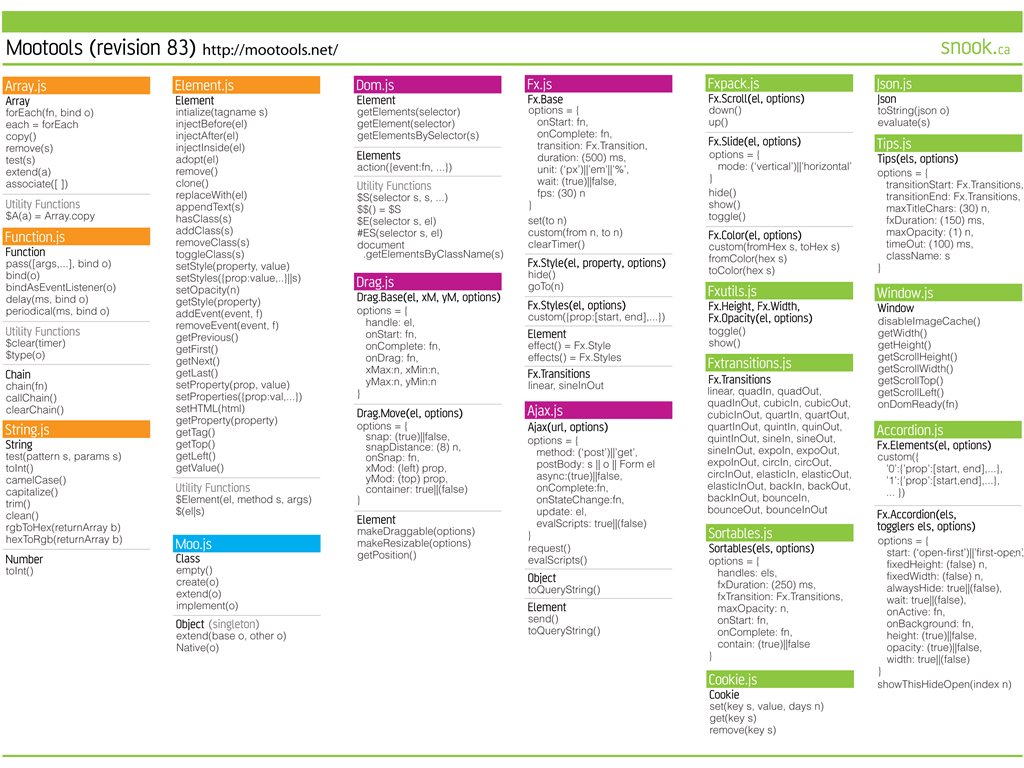
MooTools Cheat Sheet

A quick reference guide for MooTools, a super lightweight web2.0 javascript framework.
19

Adobe Illustrator Shortcuts

20

Preloading images

Este fragmento de código evitará que la carga de todas las imágenes, que pueden ser útiles si usted tiene un sitio con muchas imágenes.
$(document).ready(function() {
jQuery.preloadImages = function()
{
for(var i = 0; i”).attr(”src”, arguments[i]);
}
}
// how to use
$.preloadImages(”image1.jpg”);
});

HTML Color Codes Matching Chart

Otra visita obligada para los diseñadores. Coincidencia entre los códigos de color en CMYK, RGB y Hex nunca fue tan fácil.
21

ASP/VB Script Cheat Sheet

La hoja de trucos ASP está diseñada para actuar como un recordatorio y hoja de referencia, enumerando varias de las partes tantas veces olvidadas de ASP / VBScript. Para garantizar que la hoja de trucos es lo más útil posible.
22

HTML Character Entities Cheat Sheet

Este contiene una lista de los códigos de caracteres asignados en HTML, con un ejemplo de cómo se muestran, y la descripción.
23

Prototype Cheat Sheet

Una guía de referencia útil para Prototype, un JavaScript framework  para manipulación  fácil de Ajax y DOM.
24

MySQL Cheat Sheet

Una guía de referencia rápida para MySQL, incluyendo las funciones (tanto en MySQL y PHP), tipos de datos y consultas de ejemplo. Disponible en formatos PDF y PNG.
25

CSS Styleswitcher

Cambiar entre diferentes estilos?
$(document).ready(function() {
$(”a.Styleswitcher”).click(function() {
//swicth the LINK REL attribute with the value in A REL attribute
$(’link[rel=stylesheet]‘).attr(’href’ , $(this).attr(’rel’));
});
// how to use
// place this in your header
// the links
Default Theme
Red Theme
Blue Theme
});

JavaScript Cheat Sheet

26

Megapixels and Maximum Print Size Chart

27

The Web Developer’s SEO Cheat Sheet

28

htaccess Cheat Sheet

29

Handy Cheat Sheet of MySQL Commands

30

mod_rewrite Cheat Sheet

31

Columnas de altura igual

Si estás utilizando dos columnas CSS, utiliza esto para hacerlas exactamente la misma altura.
$(document).ready(function() {
function equalHeight(group) {
tallest = 0;
group.each(function() {
thisHeight = $(this).height();
if(thisHeight > tallest) {
tallest = thisHeight;
}
});
group.height(tallest);
}
// how to use
$(document).ready(function() {
equalHeight($(”.left”));
equalHeight($(”.right”));
});
});

mod_rewrite Cheat Sheet

Una guía de referencia rápida para  mod_rewrite, incluyendo variables de servidor, flags y la sintaxis de expresiones regulares. También incluye ejemplos de rules de uso común.
32

Computer Arts Keyboard Shortcuts

Una guía esencial de shortcuts de la revista de mayor venta del mundo. creative magazine.
33

Gosquared CSS help sheets

34

CSS Shorthand Cheat Sheet

35

W3C – Cascading Style Sheets, Current Work

36

CSS suporte en Opera 9.5

37

RGB Hex Tabla de colores

38

XML (eXtensible Markup Language) en una pagina

39

Script.aculo.us Cheat Sheet

Una guía de Scriptaculous.
40

PHP Cheat Sheet

41

Font resizing

¿Quieres dejar que los usuarios cambien el tamaño de el fuente?
$(document).ready(function() {
// Reset the font size(back to default)
var originalFontSize = $(’html’).css(’font-size’);
$(”.resetFont”).click(function(){
$(’html’).css(’font-size’, originalFontSize);
});
// Increase the font size(bigger font0
$(”.increaseFont”).click(function(){
var currentFontSize = $(’html’).css(’font-size’);
var currentFontSizeNum = parseFloat(currentFontSize, 10);
var newFontSize = currentFontSizeNum*1.2;
$(’html’).css(’font-size’, newFontSize);
return false;
});
// Decrease the font size(smaller font)
$(”.decreaseFont”).click(function(){
var currentFontSize = $(’html’).css(’font-size’);
var currentFontSizeNum = parseFloat(currentFontSize, 10);
var newFontSize = currentFontSizeNum*0.8;
$(’html’).css(’font-size’, newFontSize);
return false;
});
});

Suave (animado) desplazamiento de páginas

Para un suave(animación) movimiento de vuelta a la parte superior de la pagina (o cualquier lugar).
$(document).ready(function() {
$(’a[href*=#]‘).click(function() {
if (location.pathname.replace(/^\//,”) == this.pathname.replace(/^\//,”)
&& location.hostname == this.hostname) {
var $target = $(this.hash);
$target = $target.length && $target
|| $(’[name=' + this.hash.slice(1) +']‘);
if ($target.length) {
var targetOffset = $target.offset().top;
$(’html,body’)
.animate({scrollTop: targetOffset}, 900);
return false;
}
}
});
// how to use
// place this where you want to scroll to

// the link
go to top
});

Obtener el mouse cursor x y axis

$(document).ready(function() {
$().mousemove(function(e){
//display the x and y axis values inside the div with the id XY
$(’#XY’).html(”X Axis : ” + e.pageX + ” | Y Axis ” + e.pageY);
});
// how to use
});

jQuery timer callback functions

$(document).ready(function() {
window.setTimeout(function() {
// do something
}, 1000);
});

Python Cheat Sheet

Python Cheat Sheet, a quick reference guide for the Python programming language.
42

Remover una palavra

$(document).ready(function() {
var el = $(’#id’);
el.html(el.html().replace(/word/ig, “”));
});

Verificar que un elemento existe en jQuery

$(document).ready(function() {
if ($(’#id’).length) {
// do something
}
});

Hacer todo el DIV clickable

$(document).ready(function() {
$(”div”).click(function(){
//get the url from href attribute and launch the url
window.location=$(this).find(”a”).attr(”href”); return false;
});
// how to use
});

viernes, 23 de abril de 2010

ColoRotate [combinaciones de colores]


Se eres diseñador o te interesa todo el motivo estetico de la combinacion de colores ColoRotate te ayuda a encontrar las colores adequadas a una seleccion primaria de colores que decidas para tu trabajo en design.


ColoRorate, una forma sencilla de visualizar paletas de colores en tres dimensiones y crear nuevas selecciones de modo que unos colores encajen con otros.

Link: ColoRotate

sábado, 17 de abril de 2010

FreePSDTheme: excelentes diseños web gratuitos en formato PSD


FreePSDTheme es un excelente sitio web en donde encontraremos plantillas web (templates) de calidad premium que pueden ser descargados gratuitamente.
Los diseños realizados por Dany Duchaine están en formato PSD (Photoshop) por lo que pueden ser editados fácilmente para adaptarlos a nuestras necesidades. También podemos comprar las plantillas codificadas en HTML o listas para usar en Wodpress por precios realmente muy económicos.
Todas las plantillas pueden descargarse gratuitamente y pueden ser utilizadas en cualquier tipod de proyecto, tanto personal como comercial.

navflow – Pruebas de usabilidad en diseños web


Navflow es un test de usabilidad que los diseñadores web pueden usar para comprobar cómo los visitantes de una página web van a navegar entre el contenido del sitio.
Sólo tenemos que subir los diseños de las diferentes páginas que componen una sesión típica de navegación en la web y decidir si queremos usar la comunidad de testers de navflow o mantener el proyecto privado para que podamos elegir nuestros propios usuarios.
Podemos participar de cualquier test existente en navflow. El sistema nos mostrará una página y tendremos que intentar navegar en ella, los clicks serán mostrados al responsable por el diseño de la misma, que usará la información para saber qué partes llaman más o menos la atención.
Los resultados se muestran en forma de gráficos, de forma intuitiva y sencilla de entender, perfecto para que podamos tomar decisiones sobre alteraciones en la estructura del contenido.